Invoicing & tax
Sequential invoice numbers on Shopify, without gaps
· 3 min read
Your invoices need numbers that run in order, with no gaps, but your Shopify invoices only show the order number, such as #1001. Your accountant may have told you that isn’t enough. The short answer: give invoices their own number series, separate from Shopify’s order numbers, and number each invoice when it’s actually issued. Foliant does this for invoices, credit notes and quotes.
Why the order number isn’t an invoice number
Shopify numbers orders, not invoices. Every order gets a number the moment it’s placed, whether it’s later paid, cancelled or refunded. That’s handy for finding an order, but it isn’t an invoice register:
- It counts orders, not invoices. A cancelled order keeps its number, even if you never invoice it.
- Refunds have no number. A refund needs its own numbered credit note, and Shopify doesn’t give it one.
- Draft orders have their own numbers, counted separately.
- You can change the order number’s format in Shopify, so old and new invoices may not look like one series.
What an invoice sequence usually needs
In the EU and many other countries, each invoice needs a unique number from a sequence, so every invoice can be identified and none can go missing unnoticed. In practice:
- Unique: no two invoices share a number.
- In sequence: numbers go up, one after another.
- No unexplained gaps: if a number wasn’t used for a normal invoice, you can show why, for example because it was voided.
- Separate series are often allowed, such as one per year (
INV-2026-0001) or one for credit notes.
What exactly is allowed varies by country, so check with your accountant which rules apply to your business.
Set it up in Foliant
Only templates with a document type are numbered. In your invoice template’s settings, set Document type to Invoice. Packing slips and other templates set to Other (not numbered) never use up a number.
Then turn numbering on:
- Go to Settings › Documents & printing.
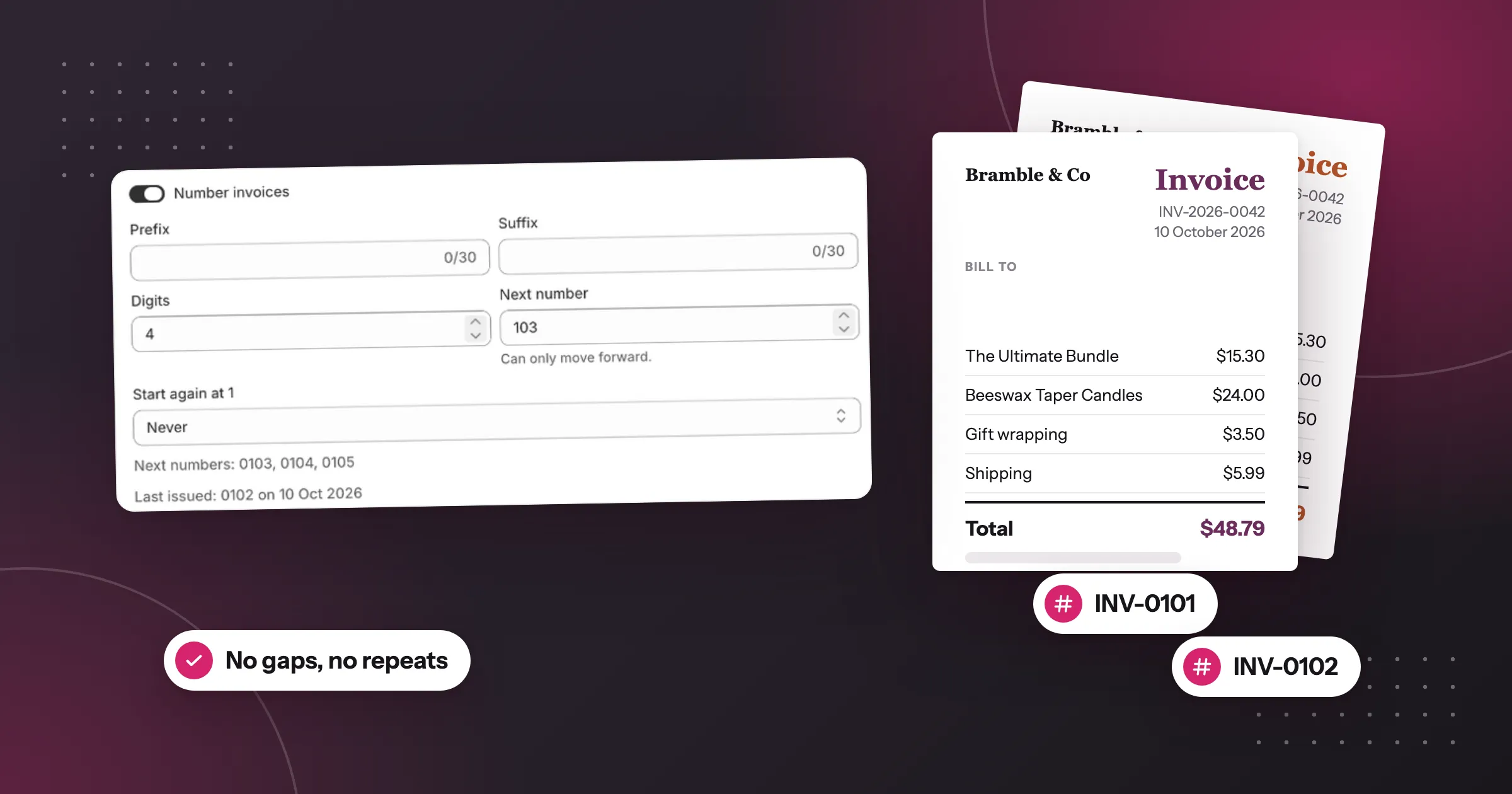
- In Document numbering, turn on Number invoices.
- Set Prefix, Suffix, Digits and Next number. Coming from another app? Set Next number to the one after your last invoice.
- Choose Start again at 1: Never, Every year or Every month. A yearly restart needs
{year}in the prefix or suffix, so numbers never repeat. - Check the Next numbers preview, click Save, then Save numbering.
If you refund orders, turn on Number credit notes too, so each refund gets a number from its own series.
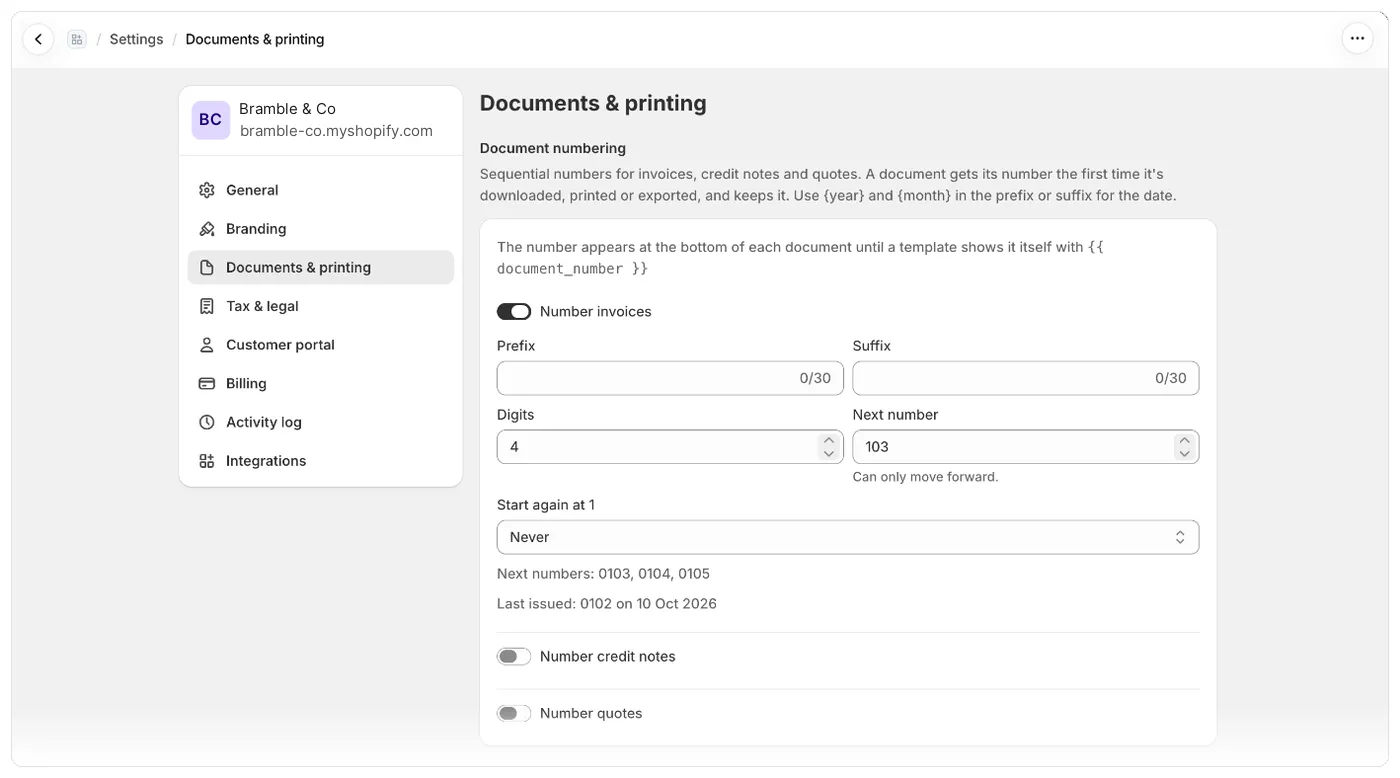
Numbers are given when an invoice is issued
Foliant doesn’t number an order when it’s placed. An invoice gets its number the first time it’s made for a real order: when you print, download or export it, or when Foliant emails it. After that it keeps the same number every time. Template previews show an example number and don’t use one up.
That’s what keeps the sequence clean. Foliant gives each number once and never reuses, skips or repeats one, even when two people print the same order at the same moment.
One thing to watch: if you email invoices as soon as an order is placed and the order is then cancelled, its number is voided. It stays in your sequence, marked as void, and isn’t given to another order. To avoid voided numbers, send invoices when the order is paid instead.
Good to know
- Numbers follow the order invoices are issued in, not order dates. Print yesterday’s order after today’s, and today’s gets the lower number.
- Next number can only move forward, and each change is recorded in Settings › Activity log, so a jump in the sequence can be explained.
- Each order has one invoice number, even if you have several invoice templates.
- You can see an order’s numbers in the Shopify admin, in the Document numbers block on the order.
- Draft orders don’t get invoice numbers. Use a template with Document type set to Quote for them.
- Document numbering is included on every plan.
The full steps are in the help centre: Set up document numbering.
Questions
Is the Shopify order number an invoice number?
No. Shopify numbers orders, not invoices: every order gets a number when it's placed, even if it's later cancelled, and refunds get no number. Give invoices their own number series instead.
When does Foliant give an invoice its number?
The first time the invoice is made for a real order: when you print, download or export it, or when Foliant emails it. After that it keeps the same number, and template previews don't use one up.
Can I continue numbering from my old invoice app?
Yes. Set Next number to the one after your last invoice. Next number can only move forward, and each change is recorded in the activity log.
Can invoice numbers start again at 1 every year?
Yes. Set Start again at 1 to Every year or Every month. A yearly restart needs {year} in the prefix or suffix, so numbers never repeat.
Try Foliant free on your store.
Find it on the Shopify App Store